Understanding the Node.js Event Loop
The Secret Behind Non-Blocking Applications
If you've worked with Node.js for even a short time, you've probably heard that it's fast, lightweight, and capable of handling thousands of requests simultaneously. What's surprising is that it does all of this while running JavaScript on a single thread. At first, that sounds impossible. How can a single thread manage multiple users, API calls, database queries, and file operations without slowing everything down? The answer lies in the Event Loop. In this article, we'll explore how the Node.js Event Loop works, why it's important, and how it enables non-blocking I/O operations.

What is the Event Loop?
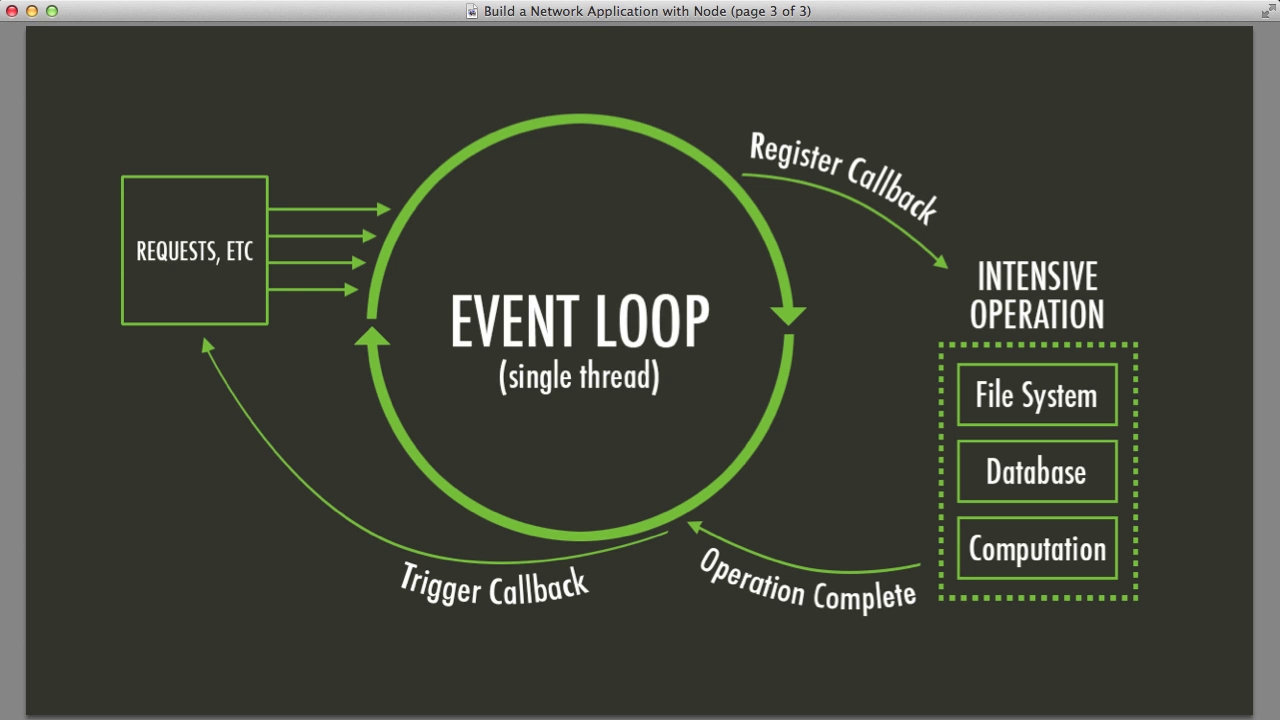
The Event Loop is the mechanism that allows Node.js to execute non-blocking operations while still using a single JavaScript thread. Imagine you're ordering food at a restaurant. Instead of standing at the counter and waiting for your meal to be prepared, you place your order, receive a token, and continue doing other things. When your food is ready, you're notified and can collect it. Node.js works in a very similar way. When your application performs tasks such as reading a file, querying a database, or calling an external API, Node.js doesn't stop and wait for the result. Instead, it hands the task off to the operating system or its internal thread pool and continues executing other code. Once the operation is completed, the callback is placed in a queue, and the Event Loop eventually executes it when the main thread becomes available. This architecture makes Node.js highly efficient for I/O-intensive applications.
const fs = require("fs");
console.log("Start");
fs.readFile("data.txt", "utf8", (err, data) => {
console.log("File Read Completed");
});
console.log("End");Output: Start End File Read Completed Even though the file read operation appears before "End", Node.js does not wait for it to finish. Instead, it continues executing the remaining code and processes the callback later through the Event Loop.
How the Event Loop Works
The Event Loop continuously checks whether there are tasks waiting to be executed. A simplified flow looks like this: Call Stack ↓ Node APIs ↓ Callback Queue ↓ Event Loop ↓ Execute Callback
- JavaScript code enters the Call Stack.
- Asynchronous operations are handed off to Node APIs.
- Once completed, their callbacks move to a queue.
- The Event Loop monitors the Call Stack.
- When the stack becomes empty, callbacks are executed.
Event Loop Phases
1. Timers Phase
Executes callbacks scheduled by: setTimeout(); setInterval(); Example: setTimeout(() => { console.log("Timer Executed"); }, 0); Even with a delay of 0 milliseconds, execution waits until the Event Loop reaches the Timers phase.
2. Pending Callbacks Phase
This phase executes certain system-level callbacks and deferred I/O operations that weren't handled in previous iterations of the loop. Most developers rarely interact with this phase directly, but it plays an important role internally.
3. Idle/Prepare Phase
This is an internal phase used by Node.js and libuv. Application developers generally don't need to worry about it, but it's part of the Event Loop lifecycle.
4. Poll Phase
The Poll phase is often considered the heart of the Event Loop. Its responsibilities include:
- Executes I/O callbacks.
- Determines whether the Event Loop should continue waiting.
- Retrieving new I/O events
Example: const fs = require("fs"); fs.readFile("test.txt", () => { console.log("File Read"); }); When the file-reading operation completes, its callback is usually executed during the Poll phase. A large portion of asynchronous work in Node.js passes through this phase.
5. Check Phase
The Check phase executes callbacks scheduled with: setImmediate(); Example: setImmediate(() => { console.log("Immediate"); }); This phase runs immediately after the Poll phase completes.
6. Close Callbacks Phase
This phase handles cleanup operations related to closed connections or resources. Example: socket.on("close", () => { console.log("Connection Closed"); }); Whenever a socket or similar resource is closed, its cleanup callback is processed here.
Microtasks vs Macrotasks
Before moving to the next Event Loop phase, Node.js executes microtasks. Microtasks Promise callbacks async/await continuations process.nextTick() Example:
console.log("Start");
Promise.resolve().then(() => {
console.log("Promise");
});
console.log("End");Output: Start End Promise Priority Order process.nextTick() Promises Event Loop Phases Example:
console.log("Start");
setTimeout(() => console.log("Timeout"), 0);
Promise.resolve().then(() => {
console.log("Promise");
});
process.nextTick(() => {
console.log("Next Tick");
});
console.log("End");Output: Start End Next Tick Promise Timeout Common Interview Question What will be the output? setTimeout(() => console.log("Timeout"), 0); setImmediate(() => console.log("Immediate")); Answer: The result is not always guaranteed. It depends on the execution context and the current Event Loop state. However, inside an I/O callback, setImmediate() generally executes before setTimeout().
Benefits of the Event Loop
High Scalability
Because Node.js doesn't create a separate thread for every request, it can efficiently handle thousands of concurrent connections with relatively low overhead.
Better Resource Utilization
Instead of blocking threads while waiting for I/O operations, Node.js continues processing other tasks, making better use of system resources.
Faster Response Times
Applications remain responsive because long-running I/O operations don't block the main execution flow.
Ideal for Real-Time Applications
1. Chat applications 2. Streaming platforms 3. Notification systems 4. APIs 5. Multiplayer games
When the Event Loop Can Become a Problem
While the Event Loop is incredibly powerful, it's not a silver bullet. CPU-intensive tasks can block the Event Loop and prevent Node.js from handling incoming requests. Example: while(true) { // Heavy computation } If code like this runs, the Event Loop becomes stuck and your application can become unresponsive. To handle CPU-heavy work, consider using:
- Worker Threads
- Child Processes
- Background Job Queues
- Microservices
These approaches allow heavy computations to run separately without blocking the main thread.
Conclusion
The Event Loop is the engine that powers Node.js's non-blocking architecture. It allows asynchronous operations to run efficiently while keeping the main thread available for handling incoming requests. Understanding how the Event Loop works isn't just useful for interviews—it's essential for building scalable and high-performance applications. It helps you write better asynchronous code, diagnose performance bottlenecks, and make smarter architectural decisions. The next time someone asks why Node.js is capable of handling so many concurrent users, you'll know the answer isn't magic. It's the Event Loop working quietly behind the scenes.